|
|
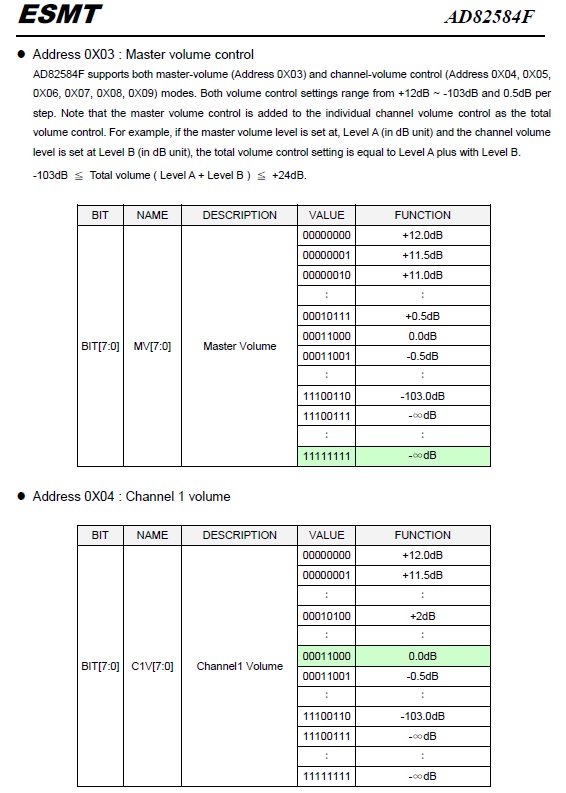
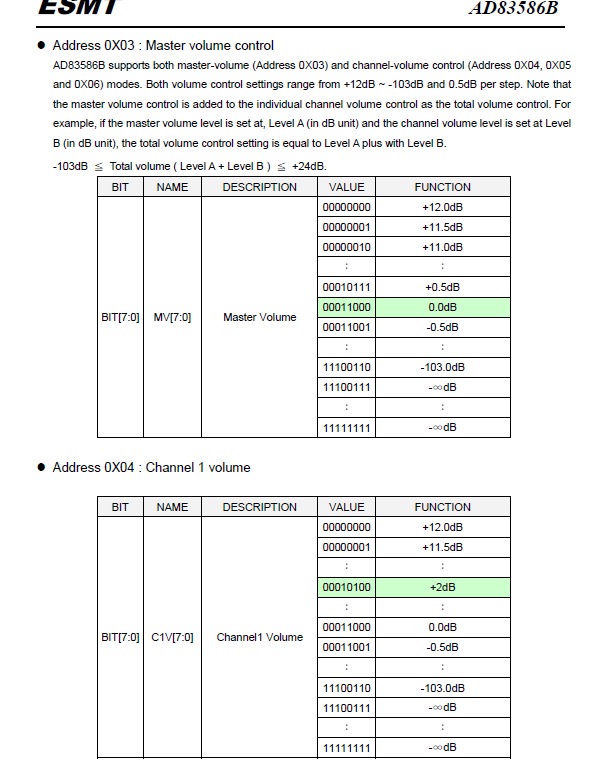
Hi Wooshin, Please refer to the following attachments (The channel 2,3... register bit definition are the same as channel 1 register). The volume of AMPs can be controlled by "Master Volume"+"Channel Volume". Master Volume: +12db to -103db. 0.5db a step Channel Volume: +12db to -103db. 0.5db a step The current default value of Master Volume and Channel Volume which Dreamus gives us are: ad83586b: {0x03, 0x18},//##Master_volume_control = 0db {0x04, 0x14},//##Channel_1_volume_control = +2db {0x05, 0x14},//##Channel_2_volume_control= +2db {0x06, 0x14},//##Channel_3_volume_control= +2db ad82584f: {0x03, 0x18},//##Master_volume_control = 0db {0x04, 0x18},//##Channel_1_volume_control = 0db {0x05, 0x18},//##Channel_2_volume_control = 0db {0x06, 0x18},//##Channel_3_volume_control = 0db {0x07, 0x18},//##Channel_4_volume_control = 0db {0x08, 0x18},//##Channel_5_volume_control = 0db {0x09, 0x18},//##Channel_6_volume_control = 0db The current audio routing implementation of Speaker volume is only to adjust the Master Volume of ad83586b and ad82584f: unsigned char ampVolume[MAX_VOLUME_TABLE] = { 0x6A, 0x68, 0x66, 0x64, 0x62, 0x60, 0x5e, 0x5c, 0x5a, 0x58, 0x56, 0x54, 0x52, 0x50, 0x4e, 0x4c, 0x4a, 0x48, 0x46, 0x44, 0x42, 0x40, 0x3e, 0x3c, 0x3a, 0x38, 0x36, 0x34, 0x30, 0x2c, 0x28, 0x24, 0x20, }; For example : Volume level 1 = ampVolume[1] = 0x68 AD82584F_Volume_regsiters.jpg (124,003 bytes) AD83586B_Volume_registers.jpg (122,992 bytes) |
|
|
I think we can provide a 32 level values with highest dB in maximum first and then provide tools to SKB for adjustment. |
|
|
Hi Wooshin, To adjust the register of AMPs, you can use the following commands (This command is included by default, so you do not have to use new image): 1. To set register value: i2cset -f -y 0 0x35 0x03 0x0 b Parameter explains: 0x35 is I2C slave addrees 0x03 is the register address, it 0x0 is the value of the register. others parameters are fixed value (-f -y 0 and b). 2.To read register value: i2cdump -f -y 0 0x35 Parameter explains: 0x35 is I2C slave address others parameters are fixed value (-f -y 0). The I2C slave address of AMPs are: AD82584F 0x31 AD83586B 0x35 ================================================== For example: To set AD83586B to Master to +12db and Channel1/2 to +12db (For Tweeter/Full Range, it needs to set channel 1 and channel 2), you can use the following commands: i2cset -f -y 0 0x35 0x03 0x0 b i2cset -f -y 0 0x35 0x04 0x0 b i2cset -f -y 0 0x35 0x05 0x0 b To set AD82584F to Master volume to +12db and Channel1 volume to +12db (For Woofer, it is mono, so only need to set channel 1), you can use the following commands: i2cset -f -y 0 0x31 0x03 0x0 b i2cset -f -y 0 0x31 0x04 0x0 b Please refer to the above datasheet page for the register values. Please also note, the current image will also adjust the volume of output audio in android framework (For example when you adjust the volume bar in UI). It will also affect the total volume you hear. |
|
|
Following volume table was not applied by dreamus. It's owner is INTEK. unsigned char ampVolume[MAX_VOLUME_TABLE] = { 0x6A, 0x68, 0x66, 0x64, 0x62, 0x60, 0x5e, 0x5c, 0x5a, 0x58, 0x56, 0x54, 0x52, 0x50, 0x4e, 0x4c, 0x4a, 0x48, 0x46, 0x44, 0x42, 0x40, 0x3e, 0x3c, 0x3a, 0x38, 0x36, 0x34, 0x30, 0x2c, 0x28, 0x24, 0x20, }; we have to find optimal table for our device. Thanks. |
|
|
Hi Wooshin, For this speaker volume adjustment, does SKB use the command we provided to get the all volume register value? I asked our HW engineer, they said it should be adjusted by dreamus beacuse they also do not know how to adjust it. |
|
|
Hi River, Following is basic concept for volume. - Amp volume set default value and volume gain will be control in Audio_policy_engine_default_stream_volumes.xml . M/W company is working for this with synaptics. If any update, I will share to you. Please wait. |
|
|
Hi Wooshin, Thanks for your information. Currently, we change the Amp registers to change volume when we recevie setParameter("vol_ctrl=dev=Speaker"). If the Amp volume needs to be set to default, then we should not change the AMP registers. So, I will remove the Amp registers change. |
|
|
Hi River Don't remove yet until final confirmation. Thanks. |
|
|
Hi Wooshin, OK. Please keep us informed when you get final confirmation. |
|
|
Hi River, SPTEK did commit code for volume control except BTV stream. We need 2 works for volume control. 1. If audio pass through mode set, sound should be output only on hdmi, not on speaker. 2. You have to control "Audio_policy_engine_default_stream_volumes.xml (c:\work\src\bfx_ua300_5.2.2\device\synaptics\sequoia)" for optimal volume level. You have to check gain using some devices which is estimate for sound volume level.(c:\work\src\bfx_ua300_5.2.2\device\synaptics\sequoia)" for optimal volume level. Please make more higher priority for this ticket. Thanks. |
|
|
Hi Wooshin, Since SPTEK commit code for volume control. I will remove the Amp registers change. Is it ok? Regarding 1. If audio pass through mode set, sound should be output only on hdmi, not on speaker. Is it possible that SPTEK calls set_parameters() to mute to all other device and unmute HDMI when passtrhough mode change? Because SPTEK can know when user change passthrough setting from UI and we already implement mute/unmute in set_parameters(). |
|
|
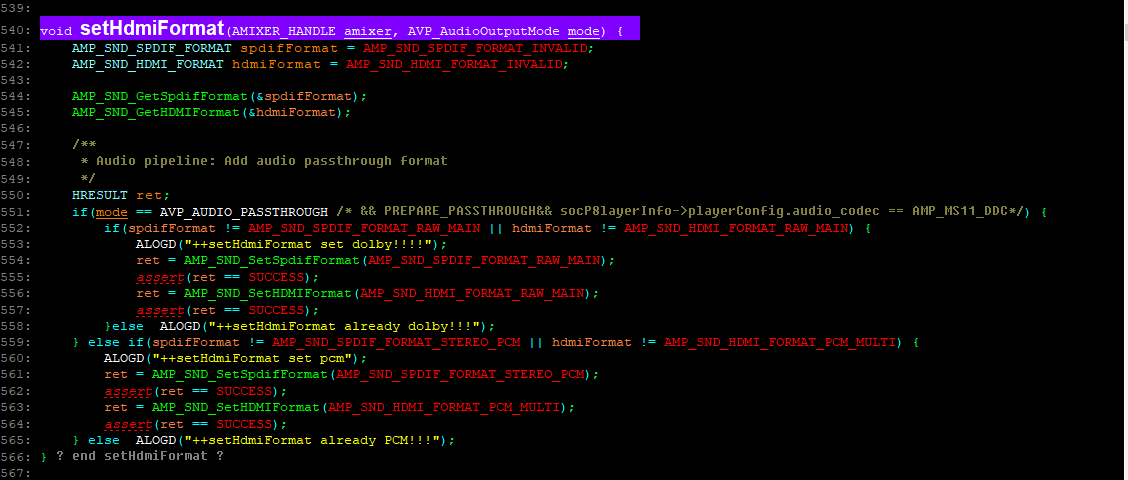
Hi River, Since SPTEK commit code for volume control. I will remove the Amp registers change. Is it ok? => Yes, you can remove. To do list. (1) volume level adjust : We need to adjust the volume linearly for 32 steps. (2) If audio pass through mode set : They don't think it is not their role. we have to do it. I have attached source code image of Amp_wrapper.c (vendor\synaptics\btv-hal-impl\bfx-ua300). You can insert some code there. passth.png (48,215 bytes) |
|
|
Hi Wooshin, Thanks for your information. The Amp register change is removed and committed to bitbucket. |
|
|
For remind (1) volume level adjust : We need to adjust the volume linearly for 32 steps |
|
|
Hi Kerwin, Please get the help from HC SQA to do volume level adjustment , just like Eagle BTF did around one month ago. |
|
|
Hi Kerwin, Please update about this issue. |
|
|
Hi Wooshin, What's difference between this issue and mantis 0001053 ? |
|
|
Hi Jacky, 1053 is for checking volume differ of each channel. In other words, we will check volume differ of audio type( AC3, AAC ) using LKFS. And if there is big differ, we will report it to synaptic to adjust it. Thanks. |
|
|
Hi Jacky, Kerwin Please check my comment of 5385, 5332 for volume. Thanks |
|
|
Hi Jack, Kerwin When is target date ? They(skb manager) are pushing me everyday. Thanks. |
|
|
Hi Wooshin, We will commit the code with modified Audio_policy_engine_default_stream_volumes.xml today and it will be included in today's F/W image. Thanks~ |
|
|
Hi, Volume of "Nugu" and "Youtube" is bigger than volume of " Vod and Live". Levels should be similar. Thanks. |
|
|
Hi Jacky, Please check comment 5595 urgently. thanks. |
|
|
Hi Wooshin, Since we can't play SKB IPTV channel from our side, so I need your help to record the IPTV stream around 30mins to us for BTV volumes. On the other hand, we can only try NUGU TTS at our side but NUGU CALL, RING shall be tried in SKB environment. Please help on this as well but I think we can apply the stream volume table of NUGU TTS to other NUGU ones. Thanks ~ |
|
|
Hi Jacky, Please download from below link. https://www.dropbox.com/sh/tbzmwuku3cnfdtr/AAC-IrZEoNVe4yNp3lLSMWBca?dl=0 Thanks. |
|
|
Hi Wooshin, Thank you for your help and we will check and tune it based on this captured stream. |
|
|
Hi Wooshin, We already applied the volume table adjustment in bitbucket and it will be included in next build. And please help to check if this adjustment is ok for you and SKB. |
|
|
Hi jacky, If commit is following, device/synaptics/sequoia changed from 0e03deac9e4a724c2458fd18100f59bd650e7726 to 85e9b60ea5129c9dcfc0228af7629d737568c3c1 [+] 85e9b60 Update 32 steps table for DEFAULT_DEVICE_CATEGORY_SPEAKER_VOLUME_CURVE & BTV_DEFAULT_DEVICE_CATEGORY_SPEAKER_VOLUME_CURVE & NUGU_TTS_DEFAULT_DEVICE_CATEGORY_SPEAKER_VOLUME_CURVE. I have done test using image included your commit but nugu volume level is bigger than BTV yet. Please check again. Thanks. |
|
|
Hi Wooshin, What kind of NUGU function did you test ? There are many NUGU stream volume tables, ex: TTS, CALL, RING, etc,... However, we only apply the volume level adjustment for NUGU TTS. |
|
|
Hi jacky, Actually I can do test only NUGU TTS. Did you apply it..? |
|
|
Hi Wooshin, I have few questions. If use the sound bar as a BT SINK device, in the scenario, users may use their smart phone to adjust the volume, also they could use the sound bar to increase the volume again; the max volume may be changed by different smart phone (or not, need to study it)...so that it could influence sound bar's speaker too. 1. How to adjust volume table when sound bar is in BT SINK mode, because it will use the same table while being BT SINK mode. 2. How to normalize the volume by using which standard? Thanks, Jim Lin |
|
|
Hi Jim, Did you check volume level on youtube and live channel ? if you hear on max level, you can hear there is some difference. Base on youtube volume, level of other source( BTB, NUGU etc) make same with youtube. And if sound bar as a BT sink device, i can understand some difference as each connected device. Thansk. |
|
|
Hi Any update..? I have attached video for your understanding. Please check it. Thanks. IMG_3034.mp4 (18,332,658 bytes) |
|
|
Hi Wooshin, I could not try live channel here, instead I tried ts file which you attached in comment 0005630. When I turned the channel to 000 (Btv), the ts stream showed, the volume was set from the reference name called BTV_DEFAULT_DEVICE_CATEGORY_SPEAKER_VOLUME_CURVE in audio_policy_engine_default_stream_volumes.xml, which was same as Youtube's volume setting. There is a way to verify if Btv and Youtube have the same max volume, I need the same audio like "1K tone 0db" for both Youtube and ts file, so that I could let QA to use reference speaker to verify it. Actually, from now on, the git commit which mentioned in comment 0005670 was: DEFAULT_DEVICE_CATEGORY_SPEAKER_VOLUME_CURVE => for Youtube or music which were outputted by build-in speaker. BTV_DEFAULT_DEVICE_CATEGORY_SPEAKER_VOLUME_CURVE => for Btv which was outputted by build-in speaker. NUGU_TTS_DEFAULT_DEVICE_CATEGORY_SPEAKER_VOLUME_CURVE => for only NUGU_TTS which was outputted by build-in speaker. all of them were using the same table (32 steps). I saw the IMG_3034.mp4, I think the way to confirm whether there is a difference between NUGU TTS and Btv is to use the same audio. I've communicated with our QA to test NUGU TTS and Youtube, they will use reference speaker to test, I'll feedback to you. Thanks, Jim Lin |
|
|
Hi Wooshin, Do you think NUGU TTS's volume is a little louder than Btv ? Thanks, Jim Lin |
|
|
I have attached test apk. you can do test for volume level of streams except BTV. BTV is not working. Thanks, |
|
|
Hi all, This is a summary from 1/13 & 1/14. The table "audio_policy_engine_default_stream_volumes.xml" was committed to the server and modified some volume levels and its values, which were referenced from... DEFAULT_DEVICE_CATEGORY_SPEAKER_VOLUME_CURVE for MUSIC STREAM TEST BTV_DEFAULT_DEVICE_CATEGORY_SPEAKER_VOLUME_CURVE for BTV STREAM TEST NUGU_DEFAULT_DEVICE_CATEGORY_SPEAKER_VOLUME_CURVE for NUGU STREAM TEST NUGU_TTS_DEFAULT_DEVICE_CATEGORY_SPEAKER_VOLUME_CURVE for NUGU_TTS STREAM TEST. Besides, ALT sent me an app (and the source code) which could let R&D or QA to test music stream, NUGU stream and NUGU_TTS stream to adjust the volume table. If there were still exist some problem, we could use this app to adjust. From now on, the NUGU stream and NUGU_TTS stream's volume were both set relative lower than music stream and Btv stream. Thanks, Jim Lin |
|
|
hi Jim, I can confirm nugu level is lower than previous version. So it is ok now but i will keep "open status" until getting official confirm from SKB. Thanks. |
|
|
HI jim, We have to adjust below table also. <name>bluetooth_sco</name> <indexMin>0</indexMin> <indexMax>32</indexMax> <volume deviceCategory="DEVICE_CATEGORY_HEADSET"> <point>1,-2000</point> <point>33,-1300</point> <point>66,-700</point> <point>100,0</point> </volume> <volume deviceCategory="DEVICE_CATEGORY_SPEAKER"> <point>1,-2000</point> <point>33,-1300</point> <point>66,-700</point> <point>100,0</point> </volume> <volume deviceCategory="DEVICE_CATEGORY_EARPIECE"> <point>1,-2000</point> <point>33,-1300</point> <point>66,-700</point> <point>100,0</point> </volume> Thanks. |
|
|
Hi Wooshin, By doing the bluetooth earphone experiment, I found out that the volume isn't controlled in bluetooth_sco "audio_policy_engine_stream_volumes_ai2_max.xml". Also, the voulme could not level it up or level it low, although the volume bar could rise on the GUI. So, it needs some time to trace the flow.. Thanks, Jim Lin |
|
|
Hi Jim, We need find out root cause why volume isn't controlled. thanks. |
|
|
Hi Jim Lin, When I adjust value in bluetooth_sco, It is applied. Please check again. example) when I change first value 0 -> 1, Mute work correctly. In current version, mute doesn't work. thanks. |
|
|
Hi Jim Lin, Please update about you test result. Thanks |
|
|
Hi Jim Lin, Please update about you test result. Thanks |
|
|
Hi Wooshin, I installed the daily-build OS version "BFX_UA300-userdebug 10 QT 19.522.43-20210208", then do some tests: 1. Modified audio_policy_engine_stream_volumes_ai2_max.xml's bluetooth_sco section, just modified 0 to 1, for example ORIGIN: <point>0, -2400</point> MODIFIED: <point>1, -2400</point> >> Still have sound in the BT earphone and could level it up and down. 2. Modified audio_policy_engine_default_stream_volumes.xml's DEFAULT_DEVICE_CATEGORY_SPEAKER_VOLUME_CURVE. >> The BT earphone could be controlled by this table. Theoretically, audio_policy_engine_stream_volumes_ai2_max.xml should work at any side, but it doesn't work on my side, I'll check the frameworks flow... Thanks, Jim Lin |
|
|
Hi Jim Lin, As i wrote on Wechat, it is ok for my side. After checking again in your side, please update. Thanks. |
|
|
Hi Wooshin, Fixed the issue after fw version 19.522.45. Thanks, Jim Lin |
|
|
I have checked it. It is OK for me. Thanks |
- yk.jung ( (ALTech) Younkwang Jung ) developer